
PDF accessibility is failing blind and visually impaired readers, and the companies responsible have little financial reason to fix it. I built a prototype to show what could be.
The problem with PDFs
As a blind or visually impaired psychology graduate student, I find the PDF to be the hardest part of academic reading. Most journal articles are distributed in this format, and unlike a Microsoft Word document, a PDF is often not a structured document. It behaves more like a canvas, a fixed picture of each page, and some PDFs have no embedded text at all. When that happens, the document is unreadable to my screen reader.
The supported setup does not work
To use a computer, I rely on a screen reader called JAWS, made by Freedom Scientific, a Vispero company. Despite costing roughly $1,000 per year, JAWS Professional 2026 does not reliably read journal articles, even when paired with Adobe Acrobat Reader, the configuration Freedom Scientific itself trains users on. Sometimes it will not read a document at all. Sometimes it starts reading and then stops partway through. Sometimes it jumps back about seven sentences, so I hear the same material again and lose my place. On top of that, ads and pop-ups in Adobe Reader interrupt playback, and without vision they can be difficult to find and dismiss. When the software skips, stops, or repeats material, I cannot be sure I have heard the full text. In academic work, you cite what you read.
This is not an unusual setup, and I did not skip the training. I have completed JAWS training and have six years of experience in software development, and Freedom Scientific has run webinars on reading PDFs in Adobe Acrobat Reader with JAWS since at least 2021. It still does not work reliably for me. If it fails for someone with my background, how is a blind student without it supposed to manage?
JAWS does include a built-in OCR feature, Convenient OCR, which Freedom Scientific teaches for inaccessible PDFs. In my experience, it carries every copyright header and footer into the text, which slows my reading and breaks its flow. Even if it worked well, it would be a workaround, not a replacement for reliable support in Adobe Reader.
A sighted reader can often work around these bugs by glancing at the screen, clicking somewhere else, or dismissing a pop-up. Someone with little or no vision cannot. A flaw that costs one reader a few seconds can end the task for another. Adobe and Freedom Scientific are both responsible, and neither has much reason to fix it, because the people who pay for these licenses, such as state agencies and universities, are often not the people who use them. This should concern educators and accessibility departments at universities.
How I have been working around it
I gained six years of technical education and industry experience in software development before returning to university to earn a Master of Science in Psychology. My program focuses on industrial and organizational psychology. For most of my program, I have worked around the PDF problem by downloading the full-text HTML versions of articles, which work much better with screen readers. When the article I need is only available as a PDF, however, I have a few options. I can try reading it in Google Chrome or Microsoft Edge, using the browser’s built-in reading tools or a text-to-speech extension. Or I can upload it to an AI tool such as Google NotebookLM or Claude and ask for a summary, but summaries can be inaccurate, and a summary is not the article. I am expected to begin my thesis process early next year, and I will not be able to skip articles just because they are only available as PDFs.
The official route
I can request an article from EBSCO as a Microsoft Word document if accessibility features are enabled on my student account. However, the email with the accessible version can take up to nine weeks to arrive, by which point my course is over. In practice, this process does not give me equal access to course materials.
In my experience, students stop asking after a few requests go unfulfilled and choose other sources on the same topic. That means the cost of these failures rarely shows up in any request log. Does anyone count the articles students give up on?
Before digital text, blind students relied on human readers and on recorded textbooks and articles, produced by offices and organizations whose job was to get the material to them. Today the article already exists as digital text, and getting an accessible copy can still take up to nine weeks. So I have to ask: what are university accessibility departments being paid to do? If the answer is approving extra time, what good is extra time when the material arrives after the course has ended? And when the process fails, who is accountable to the student?
I could file a formal complaint, but I suspect the university would settle for money before it ever changed the process. I am not interested in suing my university or collecting a settlement. I wanted to read my articles. So I began solving the problem myself.
What I built
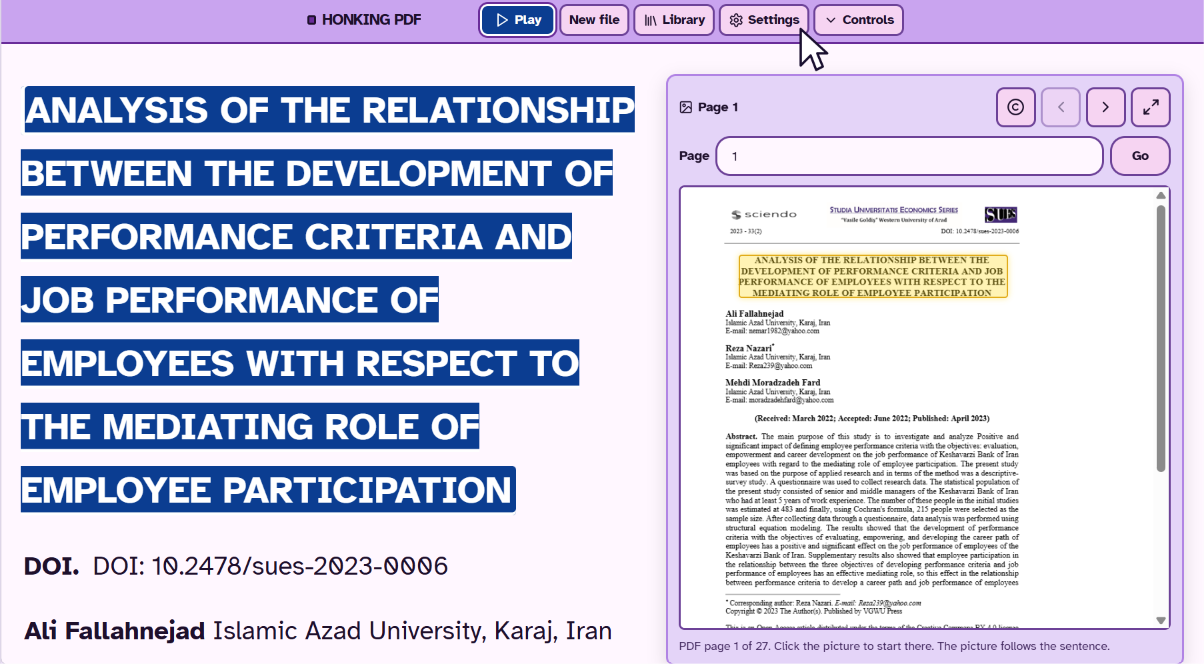
With my background in software development, I built an experimental PDF reader called HONKING PDF. It is not an OCR scanner. For each page, it first tries to extract the text already embedded in the file using traditional methods. Only when that fails does it fall back on vision and optical character recognition (OCR) models to read the page as an image, so scanned documents can usually be read as well. It also filters out running headers and footers and gathers copyright notices behind a dedicated button, reading them once at the start of the document instead of on every page. Either way, the app renders the document as normal text that can be read aloud by your screen reader of choice or by the app’s built-in voice model.
Not every computer has the hardware to run these models locally, and running them locally drains the battery faster, so I also support running them in the cloud. On first launch, the app asks a series of questions to set your preferences, and you can change them later in settings if you want to experiment.
HONKING PDF is a free web app and an experiment. It is not professional software, and it is not meant to replace your screen reader. It might help you access tricky documents, but I cannot promise it will work. Where it has to rely on text recognition, mistakes are possible, so verify anything you plan to cite.
I am one person, and HONKING PDF is a prototype. It still reads PDFs that the supported setup cannot read for me. Companies with far greater resources have not fixed this, and I believe it is because they have little reason to.
A workaround is not access
Extra time is not access. A summary is not access. A workaround is not access.
If you have a disability that affects how you read PDFs, simply prefer audio, or are just curious, I invite you to try HONKING PDF. The app itself is 100% free. Optional cloud features may require payment to your DeepInfra account.
You can try HONKING PDF at https://pdf.honkingai.com/ I hope you find it an enjoyable experience.
You must be logged in to post a comment.